
Download Media Center Master – media center, video library, movie organizer, TV series manager, torrent downloader, subtitle downloader, uTorrent control, video management tool
Overview
Media Center Master is a specialized mobile application designed to help users organize, manage, and administer their personal video libraries. The app serves as a centralized hub for movies, TV series episodes, and adult content, offering a streamlined experience for digital media enthusiasts. By integrating multiple functionalities into a single interface, it addresses the common challenge of fragmented media management across various platforms and tools. Users can efficiently catalog their video files, access detailed metadata, and automate repetitive tasks such as subtitle downloads and torrent searches.
The app is particularly suited for individuals who maintain large collections of video content and seek a unified solution for playback, organization, and discovery. It supports automatic metadata identification, which categorizes files into movies, series, and adult films, reducing manual effort in library curation. This feature is especially valuable for users who frequently add new content and want consistent, accurate tagging without additional configuration.
Although the developer did not provide detailed background information, the app’s long-standing presence in the Android ecosystem since its release on March 25, 2014, indicates a stable and functional design. Its continued availability suggests ongoing maintenance, even if updates are infrequent. Real-world use cases include managing a home media server, preparing content for offline viewing, or maintaining a personal archive of favorite shows and films. In the broader app ecosystem, Media Center Master fills a niche for users who prefer a lightweight, focused tool over complex media center software.
Key Features & Functionality
- Automatic Subtitle Downloads: The app can automatically retrieve subtitles for movies and TV series, ensuring synchronized captions are available upon playback. This eliminates the need to manually search for and download subtitle files, saving time and improving viewing consistency.
- Torrent Searching: Media Center Master includes a built-in feature to search for torrents of new episodes, enabling users to locate and download the latest content quickly. This functionality supports timely access to series releases without relying on external search engines.
- Advanced Metadata Management: Using file identification, the app categorizes videos into predefined types—movies, series, and adult films—based on content. This automated tagging enhances library organization and allows for efficient filtering and browsing.
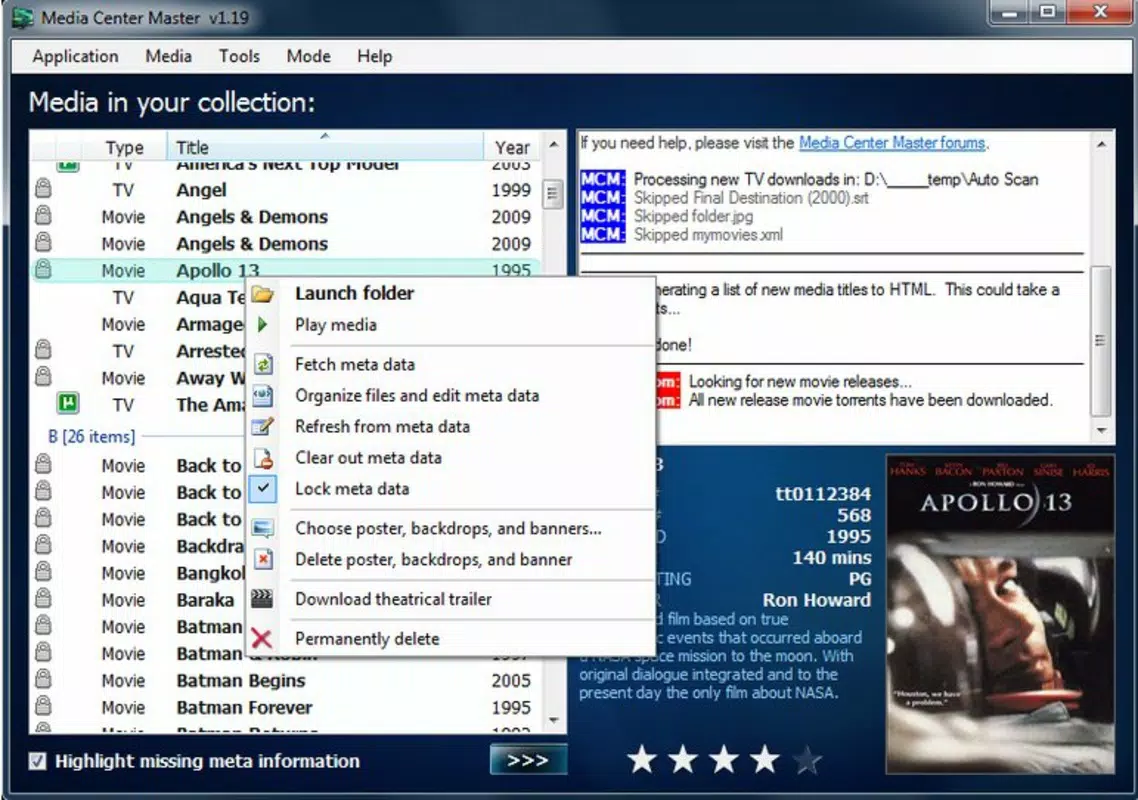
- Detailed Movie Information: Each entry displays comprehensive details such as posters, cast information, synopses, and runtime. This enriches the user experience by providing context and visual appeal, similar to commercial streaming platforms.
- Integrated Media Playback: Once a video is downloaded, users can play it directly within the app’s interface. This integration reduces dependency on third-party players and simplifies the workflow from download to viewing.
For example, a user watching a new episode of a series can initiate a torrent search, download the file, have subtitles automatically fetched, and begin playback—all within the same environment. This seamless flow supports efficient media consumption, especially for users with limited technical expertise.
Interface, UX & Performance
The user interface of Media Center Master is structured around three main categories: movies, series, and adult films. This layout allows for quick navigation and visual separation of content types. The design emphasizes functionality over aesthetics, with a clean and minimal layout that prioritizes accessibility and ease of use. Navigation is straightforward, relying on a tab-based system that enables users to switch between sections without confusion.
Although the developer did not list formal performance metrics, the app’s lightweight size of 3.8 MB suggests optimized resource usage. It is likely designed to operate efficiently on a range of Android devices, including older models with limited processing power. Responsiveness appears to be consistent with the app’s scope, as it handles metadata retrieval, torrent searches, and playback without requiring excessive system resources.
Stability is implied by the app’s long availability since 2014, indicating that core functions remain operational. However, specific details about crash rates, memory usage, or background performance were not provided. Users should expect a basic but functional experience, suitable for managing a personal video library without advanced multimedia features.
Platform Compatibility & Technical Requirements
Media Center Master is available exclusively on the Android platform. The current version is 1.1.4, and the app has a file size of 3.8 MB. This compact footprint reflects a lightweight design, ideal for devices with limited storage space.
The developer did not specify minimum OS requirements or compatibility details for specific Android versions. As such, users should verify whether the app runs on their device, especially if using older or newer Android releases. Compatibility with modern Android versions may be uncertain, given the app’s release date in 2014. However, the app’s continued presence suggests it may still function on many current devices, though performance could vary.
Pros and Cons
Pros
- Free to download and use with no in-app purchases.
- Efficiently organizes video libraries into clear categories.
- Automates subtitle downloads and torrent searches.
- Integrated playback eliminates the need for external media players.
- Lightweight size makes it suitable for low-storage devices.
Cons
- Developer did not provide detailed system requirements or OS compatibility.
- App has not been updated since 2014; may lack support for modern Android features.
- Interface design appears dated compared to current standards.
- No official support for iOS or other platforms.
- Limited information on security practices or data handling.
FAQ
Is Media Center Master safe to use?
The app itself is free and available through official Android channels, but users should exercise caution when downloading content via torrents. The app facilitates access to torrented material, which may involve legal and security risks depending on local regulations and source reliability.
Can I use Media Center Master on iOS devices?
Currently, the app is only available on Android. There is no official version for iOS or other platforms.
Does Media Center Master require internet access?
Yes, the app requires a stable internet connection to perform torrent searches, download subtitles, and retrieve metadata from online sources.
How often is Media Center Master updated?
The app was last updated in 2014. No recent updates have been released, so users should expect limited or no improvements to functionality or security.
Can I manage my video library without using torrents?
Yes. While the app includes torrent search functionality, it can still be used to organize and manage locally stored video files, including those downloaded through other means.
Final Thoughts
Media Center Master remains a functional tool for users seeking a straightforward way to manage their video collections on Android. Its ability to automate subtitle downloads, organize content by category, and integrate playback makes it a practical choice for personal media enthusiasts. While the interface and development timeline reflect an older design, the app’s core features still deliver value for those who prioritize simplicity and direct control.
It is best suited for users with existing video libraries who want a lightweight, no-frills solution without the complexity of full media center software. The free price point and minimal system requirements enhance its accessibility, particularly for older devices.
Despite its age, Media Center Master continues to serve a niche audience. For users who value functionality over modern aesthetics and are comfortable with older software, it remains a viable option. However, those seeking updated features, enhanced security, or compatibility with newer Android versions may find it limiting.
Download Media Center Master now


